Flash Gallery

I found on the Internet a Free Flash Gallery! Here is the official website and here is the example.
How to configurate:
[1] Prepare your photos and move it in Gallery Folder. Here you have the original
photos and thumbnail that he need to be resize at 70px x 70 px and rename it like
syourphoto.jpg

[2] The next step si to edit the XML file ( right click -> Open with -> Notepad ) and to write the name of your photos!
Saw if you have a photo with the name GOOGLE, for thumbnail the name is sgoogle.jpg
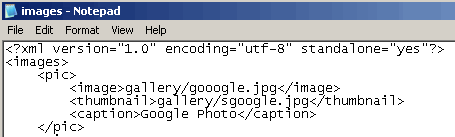
[3] That’s it! Save it and open demo.html page in your browser. Download the Gallery from here and look at
the example here! Thank you!
Tags: Adobe, Design, Flash, Free Flasg Gallery, free tools, HTML, macromedia, Photo Album, swf, webdesign, XML
November 17th, 2007 at 2:48 am
Great resource, thanks for the post. I love the site. I look forward to visiting soon.
July 3rd, 2008 at 8:17 pm
Hey… I found it at templatemonster tutorials. Very nice!
Could u help me? I´d to change the “bigImage” size, but when I do it doesnt show description anymore. Why? And What Am I Supposed To Do ?
10x =)
July 13th, 2008 at 7:42 am
thank you. very helpful!